
Free Favicon Generator Online
Need a favicon generator that is fast, free, and easy to use? ToolSphare helps you turn a square PNG or JPG logo into browser-ready favicon sizes directly in your browser. Whether users search favicon generator, free favicon generator, favicon generator online, png to favicon generator, image to favicon generator, or favicon generator from png, this page is designed to match that intent and deliver a practical website-icon workflow with no sign-up required.
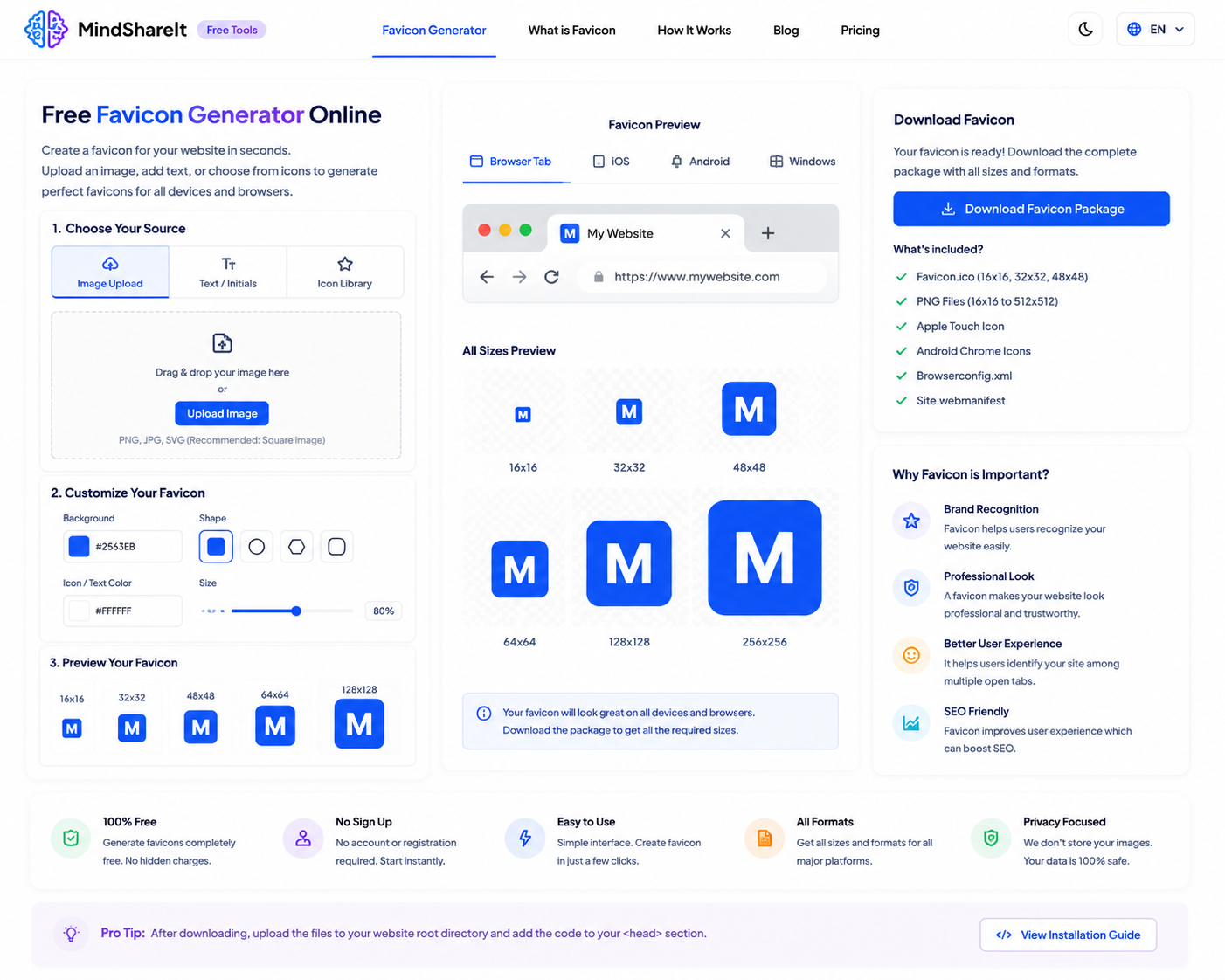
How to Use
- Upload a square PNG or JPG logo — 512×512 works best for sharp results.
- Preview generated favicon sizes at 16×16, 32×32, and 180×180 pixels.
- Click Download 32×32 PNG to save your favicon file instantly.
- Add the favicon to your website, blog, or project using your platform's settings or HTML.
Features
- Free favicon generator online with no account required
- Create favicon previews at 16×16, 32×32, and 180×180
- Upload PNG or JPG logos and brand images
- Useful for websites, blogs, portfolios, and landing pages
- 100% browser-based — your logo stays on your device
- Instant PNG download for the standard 32×32 favicon size
Free Favicon Generator Online
This page is built for users searching high-intent phrases like favicon generator, free favicon generator, favicon generator free, favicon free generator, and favicon generator online. Instead of installing desktop software or paying for a design subscription, ToolSphare gives you a direct browser workflow to create favicon files from your existing logo.
Searches such as favicon generator online free, online favicon generator, free online favicon generator, online free favicon generator, and favicon generator for website usually come from users launching a site, updating branding, or fixing a missing tab icon. They want a simple image-to-favicon workflow without friction.
The process is straightforward: upload your logo, preview the generated sizes, and download the favicon PNG. That direct path is what makes favicon generator one of the most common design utility searches for new websites and blogs.
PNG to Favicon Generator and Image to Favicon
Many users search using format-specific variants such as png to favicon generator, favicon generator from png, image to favicon generator, favicon image generator, favicon icon generator, image favicon generator, and favicon generator from image. These all point to the same task: convert an existing logo or image into favicon sizes.
ToolSphare accepts PNG and JPG uploads, which covers the most common branding workflows. A square source image produces the cleanest results, especially for logos that need to stay readable at very small sizes in browser tabs.
If your logo is not square yet, use ToolSphare's Image Cropper first to create a 1:1 version, then return here to generate favicon previews and download the 32×32 PNG.
Favicon Sizes for Browsers and Apple Touch Icons
Size-related searches such as favicon size generator, favicon generator 16x16, favicon generator 32x32, 32x32 favicon generator, favicon 16x16 generator, favicon generator 48x48, favicon generator 64x64, and favicon generator 512x512 show that users care about getting the right dimensions for different platforms.
ToolSphare previews three practical sizes: 16×16 for classic browser tabs, 32×32 for standard favicon usage and download, and 180×180 for Apple touch icon style use cases. This helps with searches like favicon apple touch icon generator, apple favicon generator, and favicon generator for all devices at a basic level.
The current download button exports the 32×32 PNG, which is the most common favicon size for modern websites. Preview the smaller and larger versions on the page before downloading to confirm your logo still looks clear when scaled down.
Website, Site, and Blogger Favicon Workflows
Platform-oriented searches such as site favicon generator, website favicon generator, favicon generator for website, favicon generator for blogger, blogger favicon generator, favicon generator for wordpress, wordpress favicon generator, and shopify favicon generator reflect users preparing icons for a specific publishing workflow.
ToolSphare focuses on generating the favicon image itself. After download, you can upload the PNG to WordPress, Blogger, Shopify, Squarespace, or your static site folder depending on the platform you use. The page is optimized for the generation step, not for CMS-specific installation.
If you searched favicon generator website or web favicon generator, this tool gives you the asset first so you can complete the platform upload second.
Favicon ICO and Format Notes
ICO-related queries such as favicon ico generator, favicon .ico generator, ico favicon generator, online favicon ico generator, favicon generator ico, favicon generator png to ico, and favicon ico generator online usually expect a downloadable .ico file rather than PNG.
ToolSphare currently generates PNG favicon output and previews common PNG sizes in the browser. PNG favicons are widely supported in modern browsers, but users who specifically need a classic .ico file may still search those terms while comparing tools.
This page is honest about that distinction. It targets favicon generator and image-to-favicon intent first, while acknowledging ICO-related searches as adjacent format needs rather than overstating unsupported output.
What This Page Does Not Target as the Main Intent
Your keyword set also includes adjacent searches such as svg to favicon generator, favicon generator from svg, svg favicon generator, favicon generator from text, text to favicon generator, ai favicon generator, favicon generator ai, animated favicon generator, favicon html generator, and favicon code generator. These represent different workflows from uploading a finished logo image.
To keep search intent clean, this page focuses on image-based favicon generation from PNG or JPG uploads. Users searching text-to-favicon, AI-generated icons, SVG conversion, animated GIF favicons, or HTML snippet generators need different tools or features.
Developer-library phrases such as favicon generator php, favicon generator npm, favicon generator github, favicon generator nextjs, and favicon generator javascript code are also secondary. This page is optimized for site owners and creators who want a free online favicon generator, not for backend implementation searches.
Before You Upload to Your Site
Check your favicon on both light and dark browser tabs to make sure the icon remains readable at 16×16. Thin lines and tiny text often disappear at favicon size.
After replacing a favicon, clear browser cache or hard-refresh the site because browsers may keep old icons for longer than normal image assets.
Frequently Asked Questions
Is this a free favicon generator online?
Yes. ToolSphare works as a free favicon generator online, so you can upload a logo, preview favicon sizes, and download a PNG without creating an account.
Can I use PNG to create a favicon?
Yes. Upload a PNG or JPG logo and ToolSphare generates favicon previews. This covers searches like png to favicon generator, favicon generator from png, and image to favicon generator.
Which favicon sizes are generated?
The tool previews 16×16, 32×32, and 180×180 sizes. The download button currently exports the 32×32 PNG, which is the most common favicon size for websites.
Does this create a .ico file?
No. This favicon generator creates PNG output. If you specifically need favicon ico generator or .ico download support, you may need a dedicated ICO conversion step after generating the PNG.
Can I generate a favicon from text or AI?
No. This page is focused on image-based favicon generation from an uploaded logo. Searches like favicon generator from text, text to favicon generator, or ai favicon generator need a different workflow.
Is my logo uploaded to a server?
No. Favicon generation happens entirely in your browser, which helps keep your brand assets private during creation.
What image size should I upload?
A square PNG or JPG around 512×512 works best. Simple logos with strong contrast usually remain readable at 16×16 and 32×32.
Can I use this for WordPress or Blogger?
Yes. Generate and download the favicon here, then upload it through your WordPress, Blogger, Shopify, or site settings using the platform's favicon or site icon option.
