


Finding a truly free text to speech online tool without forced account registration, credit card requirements, or harsh 100-character caps used to feel impossible. Today, neural voice synthesis powered by deep learning delivers human-level intonation, natural breathing cadences, and accurate phonetic pronunciation across dozens of languages. In this definitive guide, we explore how modern text to voice tools work, how to generate broadcast-ready speech for free, and how to download pristine MP3 audio files directly to your mobile phone or laptop without signing up for paid subscriptions.
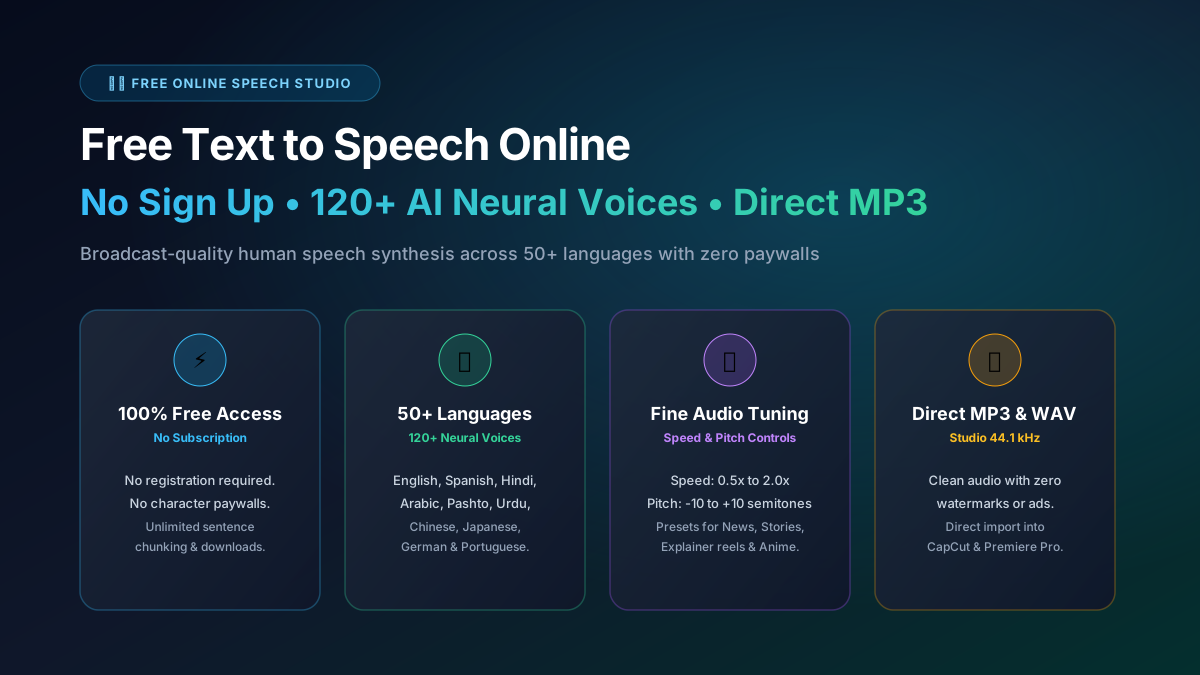
Key Takeaways: Free Text to Speech Online (No Sign Up): The Ultimate Guide
- Modern neural text to speech (TTS) uses deep transformer models that capture emotional inflection, regional accents, and human-like prosody.
- ToolSphare provides 100% free text to speech online with no registration, no watermarks, and unlimited sentence chunking.
- You can synthesize speech across 50+ languages — including English, Spanish, Chinese, Arabic, Hindi, Urdu, Bengali, Russian, Vietnamese, and Portuguese.
- Audio can be exported directly as universally compatible MP3 or uncompressed studio-quality WAV files in a single click.
- Client-side device fallbacks ensure you can listen to text even when offline or experiencing slow internet connections.
What Is Neural Text to Speech and Why Did Old Robotic Voice Synthesizers Disappear?
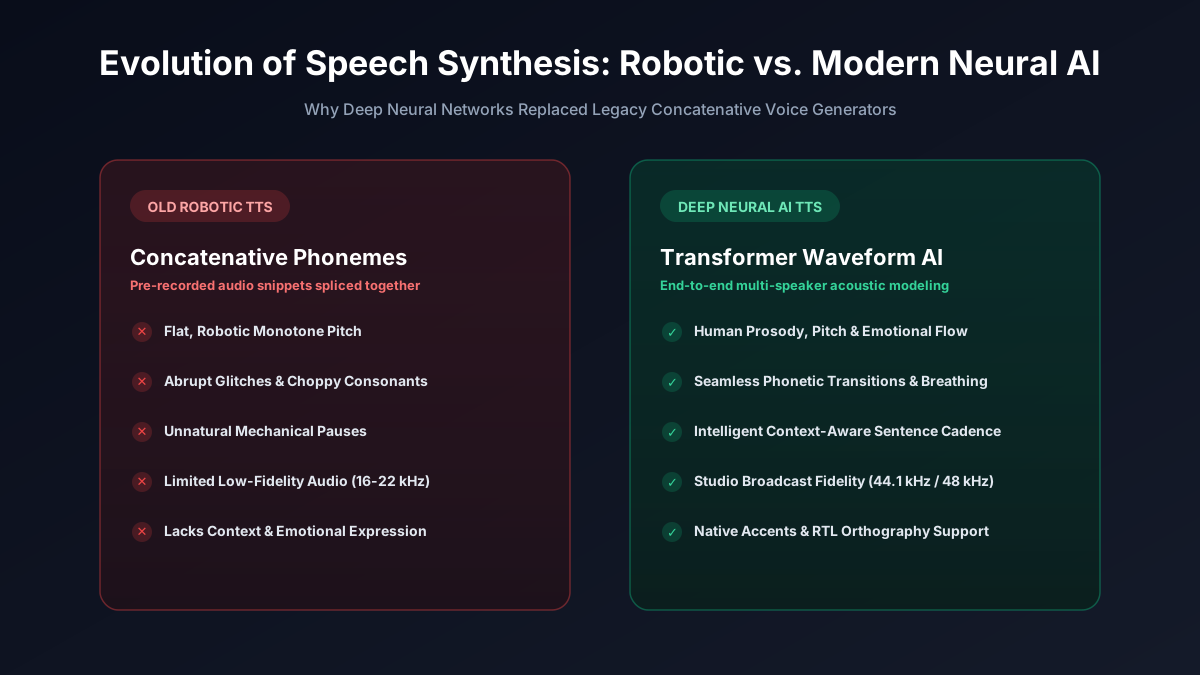
For decades, computer speech was generated using concatenative synthesis — stitching together pre-recorded phoneme snippets. The result was the infamous robotic, monotone voice that sounded artificial, clipped awkward consonants, and struggled with sentence rhythm.
Recent breakthroughs in deep neural networks (DNN) and acoustic waveform models have revolutionized the industry. Neural TTS synthesizers analyze whole phrases, evaluate grammatical context, and predict natural human pitch trajectories and breathing pauses. The voices sound remarkably human, warm, and engaging — making them ideal for listening to articles, narrating YouTube videos, or producing full-length audiobooks.
Step-by-Step: How to Convert Text to Speech Online Free with No Login
Converting your writing into speech on ToolSphare requires zero technical background:
1. Enter Your Writing: Paste your text into the editor. If you are experimenting, click the "Sample" button to insert demonstration scripts in English, Spanish, Arabic, Hindi, Chinese, French, or German.
2. Select a Neural Voice: Choose from over 120 authentic male and female voices. You can click the preview button next to any speaker to hear their tone before converting your entire script.
3. Customize Speed and Tone: Use the speed slider to set reading pace (e.g. 0.9x for slow educational lessons or 1.2x for fast-paced explainer videos). Adjust the pitch slider to fine-tune the vocal frequency.
4. Click Generate & Download: Press "Generate Voice" or use the keyboard shortcut Ctrl + Enter. Once processing completes in 2–3 seconds, preview the audio in the waveform player and click "Download MP3".
Multilingual Text to Voice: 120+ Voices Across 50+ Global Languages
Global communication requires voices that speak with authentic local pronunciation and cadence. Our free text to voice generator includes rich regional coverage:
• English Accents: North American (US & Canada), British (UK), Australian, Indian English, Irish, and South African accents.
• Spanish (Texto a Voz): European Castilian, Mexican Spanish, US Latino, Argentine Rioplatense, and Colombian voices.
• Asian Languages: Chinese Mandarin (Simplified & Taiwan Traditional), Cantonese (Hong Kong), Hindi, Urdu, Bengali, Tamil, Telugu, Marathi, Gujarati, Vietnamese, Japanese, Korean, Thai, Indonesian, and Filipino Tagalog.
• Middle Eastern & African Languages: Modern Standard Arabic (Saudi Arabia, Egypt, UAE, Morocco), Persian / Farsi, Pashto, Turkish, Swahili, and Amharic.
• European Languages: Russian, Ukrainian, French, German, Italian, Portuguese (Brazil & Portugal), Polish, Dutch, Swedish, Greek, and Hebrew.
Free Online TTS vs. Paid Subscription Tools (Luvvoice, Voicemaker, ElevenLabs)
Many commercial TTS platforms promote themselves as "free", but impose aggressive barriers as soon as you attempt to use them in real workflows. Common competitor tactics include limiting free inputs to 150 characters, inserting audio watermarks, disabling MP3 downloads, or requiring recurring monthly credit card subscriptions.
ToolSphare was built on an open productivity philosophy: core utility tools should be genuinely free, fast, and accessible to everyone. There are no monthly paywalls, no watermarks, and no artificial daily limits. Your generated audio is standard 44.1kHz MP3, completely free for personal and commercial projects.
Top Creative & Educational Use Cases for Free Text to Speech
• Content Creators & Faceless Channels: Produce clear, professional voiceovers for YouTube tutorials, TikTok trends, and Instagram Reels without microphone background hiss or room echo.
• Students & Commuters: Paste study guides, research papers, and textbook chapters to listen on headphones while walking or commuting.
• Accessibility & Assistive Reading: Individuals with visual impairments or dyslexia can comfortably consume web articles, PDFs, and written documents.
• Language Learners: Perfect pronunciation and accent comprehension by hearing native speakers read dialogues and vocabulary lists at custom speeds.
Free Text to Speech Online (No Sign Up): The Ultimate Guide FAQs
Is this online text to speech generator truly free?
Yes! ToolSphare provides 100% free text to speech without fees, credit cards, or hidden subscription costs.
Can I download the generated voice as an MP3 file?
Yes. Once conversion completes, click the green "Download MP3" button to save the audio file directly to your smartphone, tablet, or laptop.
Do I need to sign up or create an account?
No registration or login is required. You can start typing and generating audio the moment you open the page.
Can I use the audio for YouTube monetization and commercial projects?
Yes. All generated MP3 audio tracks can be used for YouTube videos, podcasts, business presentations, social media, and commercial ads.
What languages are supported?
We support over 50 world languages with 120+ natural neural voices, including English, Spanish, Chinese, Arabic, Hindi, Urdu, Bengali, Russian, Vietnamese, Portuguese, French, German, and Japanese.
More Guides Articles
Ready to try it?
Use ToolSphare free utilities to apply what you learned — no sign-up, instant results in your browser.
